# 单页面应用开发
# MPA与SPA简介
MPA
MPA (Multi-page Application) 多页面应用指的就是最传统的 HTML 网页设计,早期的网站都是这样的设计,所之称为「网页设计」。使用 MPA 在使用者浏览 Web 时会依据点击需求切换页面,浏览器会不停的重载页面 (Reload),整个操作也常感觉卡卡。如果使用这样的设计在 Web App 中,使用者体验比较差,整体流畅度扣分。但进入门槛低,简单套个 jQuery 就可以完成。
SPA
SPA (Single-page Application) 顾名思义在 Web 设计上使用单一页面,利用 JavaScript 操作 Dom 的技术实现各种应用,现今在介面上算是非常受欢迎的设计,搭配 AJAX 使得整体页面反应速度相当迅速,配合上路由懒加载等手段可以达到Native应用的体验。
# 图解
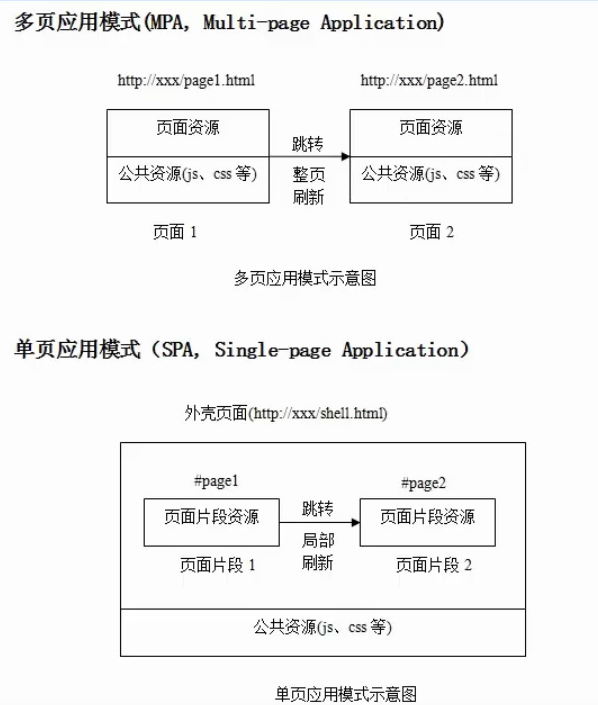
# 对比

# 路由优缺点
# hash模式
优点
- 简单,不需要服务端支持即可以完成路由跳转
缺点
- url比较丑,不像一个真正的资源地址
- hash只存在于前端页面,用于锚点功能,当服务端往前端跳转地址的时候并不能正确携带hash部分, 导致路由丢失(如微信公众号登陆回跳业务逻辑页面,第三方支付回跳支付详情)
# history/browser
- 优点
- url地址比较优雅,像一个真正的资源地址
- 缺点
- url并不是一个真正的资源地址,直接访问会出现资源404,需要服务端配合做重定向(开发环境,devServer中配置historyApiFallback,线上使用nginx或者apache做404的重定向index.html)
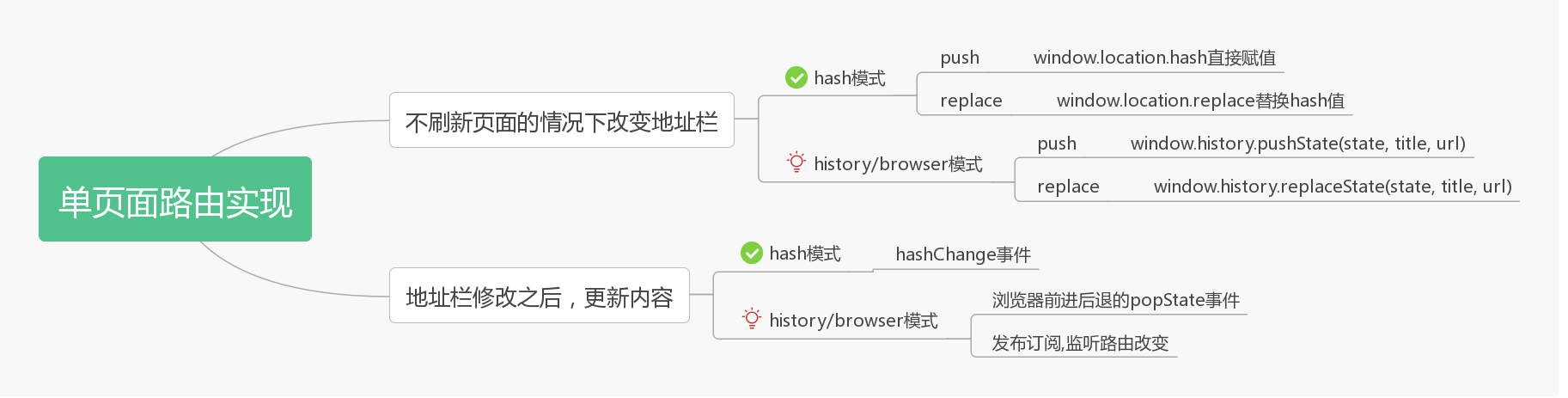
# 实现流程
# 代码实现
<!DOCTYPE html>
<html lang="en">
<head>
	<meta charset="UTF-8">
	<meta name="viewport" content="width=device-width, initial-scale=1.0">
	<meta http-equiv="X-UA-Compatible" content="ie=edge">
	<title>原生实现hash和browser两种路由模式</title>
</head>
<body>
	<div class="router_box">
		<a href="/home" class="router" replace="true">主页</a>
		<a href="/news" class="router">新闻</a>
		<a href="/team" class="router">团队</a>
		<a href="/about100" class="router">关于</a>
	</div>
	<div id="router-view"></div>

	<script>
    function Router (params) {
			// 记录routes配置
			this.routes = params.routes || [];
			// 记录路由模式
			this.mode = params.mode || 'hash';

			// 初始化
			this.init = function(){
				// 绑定路由响应事件
				var that = this;
				document.querySelectorAll(".router").forEach((item,index)=>{
					item.addEventListener("click",function(e){
						// 阻止a标签的默认行为
						if ( e && e.preventDefault ) {
								e.preventDefault();
						} else {
								window.event.returnValue = false;
						}

						if (that.mode == 'hash') {
							// 判断是replace方法还是push方法
							if (this.getAttribute("replace")){
									var i = window.location.href.indexOf('#')
									// 通过replace方法直接替换url
									window.location.replace(
										window.location.href.slice(0, i >= 0 ? i : 0) + '#' + this.getAttribute("href")
									)
							} else {
								// 通过赋值追加
								window.location.hash = this.getAttribute("href");
							}
						} else {
							if (this.getAttribute("replace")) {
								window.history.replaceState({}, '', window.location.origin+this.getAttribute("href"))
							} else {
								window.history.pushState({}, '', window.location.origin+this.getAttribute("href"))
							}
							// 手动调用更新内容方法
							that.routerChange();
						}

					}, false);
				});
				// 监听路由改变
				if (this.mode == 'hash'){
						window.addEventListener("hashchange",()=>{
								this.routerChange();
						});
				}else{
						window.addEventListener('popstate', e => {
								console.log(123);
								this.routerChange();
						})
				}
				// 第一次进入的时候更新视图
				this.routerChange();
			},
			// 路由改变监听事件
			this.routerChange = function() {
				if (this.mode == 'hash'){
					let nowHash=window.location.hash;
					let index=this.routes.findIndex((item,index)=>{
						return nowHash == ('#'+item.path);
					});

					if (index>=0) {
						// 查找到对应路由
						document.querySelector("#router-view").innerHTML=this.routes[index].component;
					} else {
						// 没找到对应路由,查找有没有*
						let defaultIndex=this.routes.findIndex((item,index)=>{
								return item.path=='*';
						});
						// 查找到*,执行重定向
						if (defaultIndex>=0) {
							const i = window.location.href.indexOf('#')
							window.location.replace(
									window.location.href.slice(0, i >= 0 ? i : 0) + '#' + this.routes[defaultIndex].redirect
							)
						}
					}
				} else {
					let path = window.location.href.replace(window.location.origin, '');
					let index=this.routes.findIndex((item,index)=>{
						console.log('path...', path, 'item.path...', item.path);
						return path == item.path;
					});
					if (index>=0) {
						// 查找到对应路由
						document.querySelector("#router-view").innerHTML=this.routes[index].component;
					} else {
						// 没找到对应路由,查找有没有*
						let defaultIndex=this.routes.findIndex((item,index)=>{
							return item.path=='*';
						});
						// 查找到*,执行重定向
						if (defaultIndex>=0){
							window.history.replaceState({}, '', window.location.origin+this.routes[defaultIndex].redirect)
							this.routerChange();
						}
					}
				}
			}
			// 调用初始化
			this.init();
    }
		new Router({
			mode: 'history',
			routes:[
				{ path: '/home', component: '<h1>主页</h1><h4>新一代前端工程师:我们啥都会</h4>' },
				{ path: '/news', component: '<h1>新闻</h1><h4>今天2018-11-5,上课还得穿工装</h4>' },
				{ path: '/team', component: '<h1>团队</h1><h4>WEB前端工程师</h4>' },
				{ path: '/about', component: '<h1>关于</h1><h4>一面而高薪就业</h4>' },
				{ path:'*', redirect:'/home'}
			]
		});
  </script>
</body>
</html>
# history404重定向解决
# 开发环境
module.exports = {
	devServer: {
		port: 3000,
		open: true,
		// 404重定向到index.html
		historyApiFallback: true
	}
}
# 线上环境
# 兼容问题
ie9及以下不支持html5 history新特性,可引入history库